


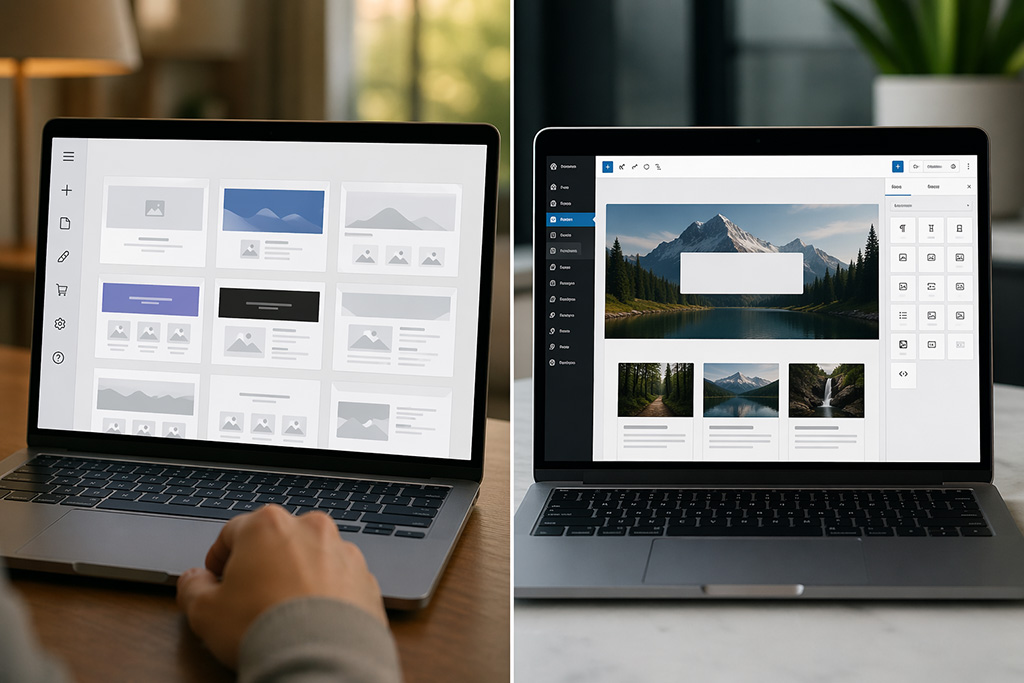
At some point, the Wix website that was easy to launch stops being easy to grow. For a lot of Denver businesses, that moment arrives when they start caring about search rankings, need a feature Wix doesn’t support, or hand their site over to a developer who tells them there’s not much they can do with what’s there. Wix is a closed platform — and for small businesses that have outgrown beginner-friendly builders, that matters.
This guide is for business owners who have already felt that ceiling and want an honest picture of what moving from Wix to WordPress website actually involves — what transfers, what doesn’t, where the real risks are, and how to make the move without losing the SEO rankings you’ve built.
Who This Guide Is For
The Wix user who’s outgrown what they started with
Most businesses that were built on Wix made a reasonable decision. The platform is accessible, affordable, and genuinely fast to get a site live. For a brand-new small business without a developer on staff, that’s often the right call.
But business sites have a way of making demands over time. More Wix pages. Better SEO. A booking system that integrates with a CRM. A developer who can extend site functionality without workarounds. Custom post types. Speed scores that don’t embarrass you. At some point, those demands run up against what Wix is architecturally designed to allow — and the gap doesn’t close with a better plan or a paid app.
If you’re at that point, you’re in the right place.
What “doing it right” actually means before you migrate
There’s a wide spectrum between “just moving the content over” and doing this properly. A thoughtful migration protects your SEO equity, produces a better site on the other side, and doesn’t require a redo six months later. A careless one can tank your rankings, break your URL structure, and leave you with a WordPress site that’s essentially just Wix with a different logo.
This guide assumes you want to do it right.
Why Wix Works — Until It Doesn’t
When Wix makes sense for a small business — and when it stops working
Wix earns its reputation for a reason. If you need a professional-looking, five-page website with a contact form and a photo gallery this week without a developer, Wix is a legitimate option. The drag-and-drop editor is genuinely intuitive, the templates are polished, and the hosting, domain, and CMS are all handled in one place. For early-stage businesses that just need a web presence, that bundled simplicity has real value.
We’re not in the business of knocking platforms to make our preferred one look better by comparison. Wix works for what it’s designed for.
The ceiling most growing businesses eventually hit
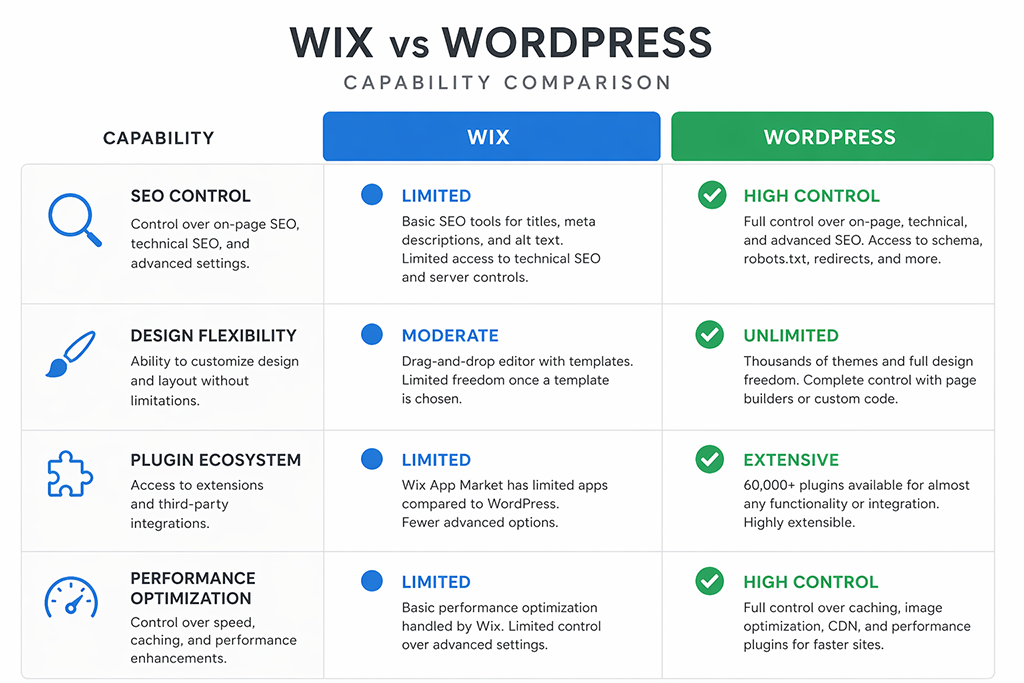
The problems emerge when a business site needs to grow. Wix’s template system locks your design into choices made at launch in ways that are difficult to reverse. The platform controls your hosting environment — Wix hosts your site on its own infrastructure, which means you can’t install plugins outside of what they approve, can’t access the server, and can’t make the kind of technical SEO adjustments that matter for competitive searches. WordPress URLs are structured cleanly and fully under your control; Wix URLs are often suboptimal and can’t always be changed without creating a redirect mess. The App Market has grown, but it’s still a controlled ecosystem — if the integration you need doesn’t exist there, it doesn’t exist.
For a local Denver business competing against established players in search, those limitations aren’t abstract. They show up in rankings. Advanced functionality that WordPress users take for granted — custom post types, granular caching, server-level redirects — simply isn’t accessible on Wix.
The performance gap: Core Web Vitals and what Wix can’t fully control
Google’s Core Web Vitals — Largest Contentful Paint, Cumulative Layout Shift, and Interaction to Next Paint — are real ranking signals, and Wix sites consistently struggle with them. Some of this is improving as Wix invests in infrastructure, but the fundamental issue is that you’re on shared architecture, and you cannot optimize. You can’t swap hosting providers, implement advanced caching, fine-tune server configuration, or control how assets load at a technical level. WordPress offers full control over all of it — with the right hosting provider and a properly built theme, performance scores that Wix can’t match are achievable for most business sites.
What You Actually Lose in a Wix to WordPress Migration (And What You Don’t)
This is the section most migration guides skip entirely. They go straight to the steps without addressing the anxiety underneath the decision. Let’s be direct about what the transition actually involves.
Wix pages and blog content — what transfers and what requires manual work
Text content — your Wix pages, blog content, and basic copy — can be exported using a Wix RSS feed file that WordPress can partially import via its built-in RSS importer. In practice, the import is never fully clean. Formatting often breaks, images need to be re-uploaded and re-embedded, and any content that lived inside Wix apps or widgets won’t transfer at all. For a five-page site, that’s a couple of hours of cleanup. For a 60-post blog, it’s a project.
Images should be re-optimized during migration rather than simply transferred. This is a built-in opportunity to fix file sizes, alt text, and naming conventions that may have been inconsistent on Wix’s end.
Wix URL structures, redirects, and the real risk to your SEO rankings
This is where migrations most often go wrong. Wix generates URLs that frequently look different from what you’d build on WordPress. When those URLs change, any ranking equity, backlinks, and Google-indexed pages that pointed to the old addresses become orphaned unless you map every old URL to its new equivalent with a proper 301 redirect.
Done correctly, a migration does not have to hurt your rankings. Done carelessly — or with a plugin that handles redirects generically rather than page-by-page — the ranking drop can be significant and slow to recover from. We’ve seen businesses lose 40–60% of organic traffic post-migration and spend months clawing it back because the redirects were handled as an afterthought.
Your existing design — why it doesn’t come with you, and why that’s actually good news
Your Wix design does not transfer to WordPress. This surprises some clients, but it shouldn’t be discouraging. What it means is that the migration is a natural forcing function for building the site you actually want, rather than inheriting the constraints of a WordPress theme chosen to approximate what Wix had, or re-creating a template you chose three years ago under different circumstances.
A custom WordPress build designed around your current business, current audience, and current SEO goals will outperform a Wix website that’s been patched and extended well past its original design intent.
Wix apps and integrations — what the WordPress ecosystem replaces
For almost every Wix app, there’s a WordPress equivalent — and frequently a better one. Email marketing integrations, booking systems, ecommerce, membership areas, contact forms, popups, CRM connections — the vast array of powerful plugins in the WordPress ecosystem is significantly larger and more competitive than Wix’s App Market. Some integrations are also cheaper once you’re not paying Wix’s per-app pricing on top of your plan. The transition to WordPress almost always expands your customization options rather than reducing them.
The Migration Process, Step by Step
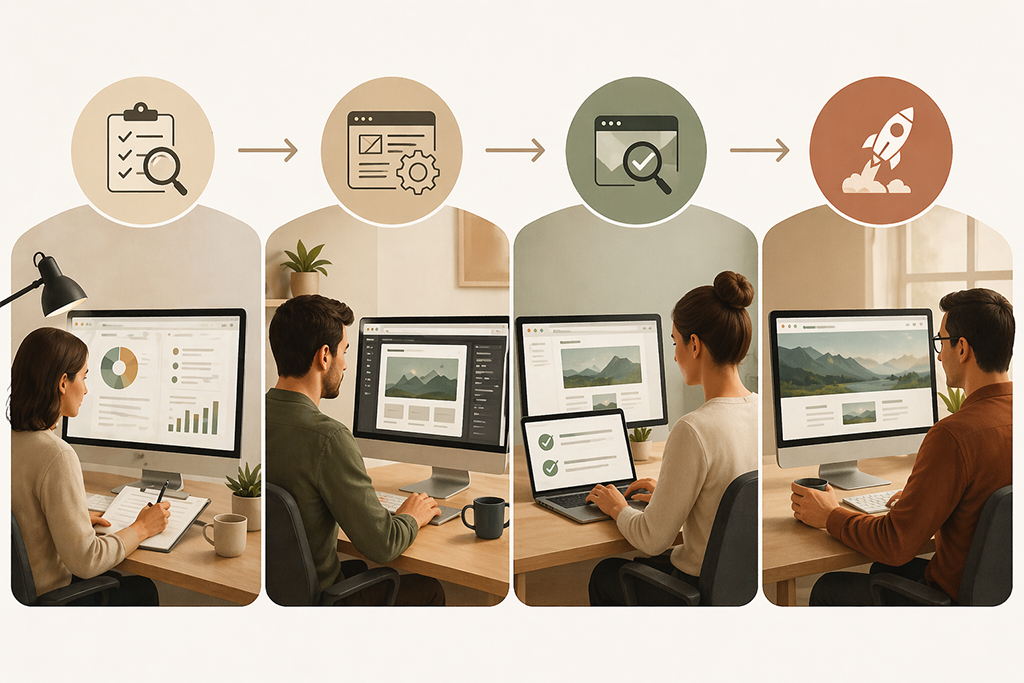
The goal here isn’t to give you a step-by-step checklist to do this yourself. It’s to show you what a proper migration involves so you understand what you’re evaluating — whether you’re doing it in-house or working with someone.
Pre-migration audit — inventory your content, pages, and current rankings before touching anything
Before anyone touches the live site, document everything. Crawl the current Wix site to capture every indexed URL. Export your Google Search Console data to record current rankings and traffic by page. Identify your highest-value pages — the ones driving real traffic or ranking for competitive terms — because those demand the most careful redirect handling. This audit is the foundation on which everything else is built.
How to install WordPress and set up your new WordPress site for migration
WordPress requires hosting you control — unlike Wix, which hosts everything on its own servers with no option to move. For a business site, that means a managed WordPress host, not shared hosting. To set up WordPress, you’ll install it through your hosting provider’s control panel, connect your custom domain name, and build on a staging environment completely separate from your live Wix site. Domain configuration happens at the end, not the beginning — your custom domain stays pointed at Wix until the new WordPress website is ready to go live.
Exporting content from your Wix site — tools, migration services, and where they fall short
To get your Wix content out, you’ll use the Wix RSS feed export along with a limited XML export that WordPress can import through its built-in importer. Third-party migration services like CMS2CMS exist but add cost and introduce their own formatting inconsistencies. When you run the importer in WordPress, expect a partial transfer — the bulk of plain text content comes across reasonably well for simple sites, but anything involving custom Wix sections, dynamic pages, or app-generated content needs to be handled manually. Plan for that time rather than assuming a tool will cover it.
Rebuilding vs. importing — why most serious migrations involve intentional rebuilding
Here’s the honest take that most agency guides won’t give you: for business sites, a thoughtful rebuild usually produces a better outcome than treating the migration as a data transfer problem. Automated imports carry over content, but they also carry over outdated page structures, bloated HTML, images that were never optimized, and organizational decisions that made sense three years ago but don’t serve the site today.
A migration is an opportunity. Use it to build the site architecture, URL structure, internal linking, and page-level SEO that the Wix site never had. The extra time spent at this stage pays dividends in organic performance for years.
301 redirects — the step most DIY migrations get wrong
Every old Wix URL with any indexed presence or inbound links needs a 301 redirect to its WordPress equivalent. Not a bulk redirect from the old domain root. A mapped, page-by-page redirect that tells Google exactly where each piece of content lives now. Google’s official guidance on site migrations is clear on this — and skipping it is the single most common reason businesses lose rankings during a platform switch.
Testing before you flip the switch
Before pointing your domain to the new WordPress site, test everything: all redirects, all forms, page speed scores, mobile rendering, internal links, and any third-party integrations. A staging environment checklist reviewed by someone who didn’t build the site catches things the developer’s eyes have stopped seeing.
The SEO Considerations Nobody Talks About
URL structure changes and how to map them properly
Wix URLs often include path patterns that don’t match what you’d build on WordPress. Some are fine. Others — particularly those generated by Wix’s dynamic pages or blog system — are structured in ways that don’t translate cleanly. Before you build the WordPress site, decide on your final URL structure and build the redirect map from the Wix URLs to the new ones. Don’t retrofit this at the end.
Preserving meta data — titles, descriptions, and schema
Every page’s meta title, meta description, and any schema markup needs to be documented before migration and rebuilt in WordPress using a plugin like Yoast SEO or Rank Math. This is tedious but non-negotiable. Losing or resetting meta data across a site of any size will show up in your rankings within weeks.
Google Search Console — what to do before, during, and after the migration
Before the migration: verify the new WordPress domain as a separate property in Search Console. After launch: submit the new XML sitemap, monitor crawl errors, and watch for indexing issues. If you see a flood of 404 errors in the first week, something in your redirect mapping was missed and needs to be corrected immediately. The Search Console coverage report will tell you exactly which URLs are returning errors.
Monitoring for ranking drops in the first 30–60 days post-launch
Some temporary fluctuations in ranking after a major site migration are normal. Google is re-crawling and re-evaluating the site. What’s not acceptable is a sustained drop over 60 days — that indicates a structural problem, usually with redirects, indexing, or canonical tags. Have a monitoring process in place before you launch, not after something goes wrong.
Should You DIY This or Hire Someone?
This is worth answering honestly rather than using it as a pitch for our services.
The honest case for doing it yourself
If your site has fewer than 20 pages, no blog with significant traffic, no inbound links worth protecting, and you have time and technical patience, a DIY migration is manageable. The risk is low because the SEO equity is low. You can use a plugin like Duplicator to handle the WordPress setup, manually rebuild the pages, and use a simple redirect plugin to handle the URL changes. It’ll take a weekend, but it’s doable.
Where DIY migrations consistently go sideways
The pattern we see: a business owner handles the migration themselves, the new site goes live, and six months later they come to us because their traffic hasn’t recovered. In almost every case, the redirect mapping was incomplete, the URL structure wasn’t planned in advance, or the metadata didn’t survive the transfer. These aren’t things that are immediately obvious — they show up slowly in traffic reports.
The other common failure: treating the migration as a content transfer and not a site redesign. The WordPress site ends up looking and performing like a slightly worse version of the Wix site, which doesn’t justify the effort.
What a professional migration includes that a plugin transfer doesn’t
A professional migration includes the audit, URL mapping, rebuild decisions, redirect implementation, technical SEO setup, testing, and post-launch monitoring. It also includes someone who’s done this enough times to know where things break and catch them before they do. That’s not a sales pitch — it’s just what the scope actually involves when it’s done properly. If you’re considering having this done by an agency, our custom WordPress web design in Denver covers exactly this kind of project.

What a Custom WordPress Build Delivers That Wix Never Will
Full design and development control
On WordPress, there’s no template ceiling. The design is built to your specifications, your brand, and your conversion goals — not adapted from a starting point someone else chose. You can add functionality without checking whether Wix has approved an app for it. You can hand the site to any developer in the world and they’ll know how to work with it. That portability and extensibility is worth something real.
SEO infrastructure built the right way from day one
WordPress, built properly, gives you complete control over every technical SEO element: URL structure, page speed optimization, schema markup, canonical tags, XML sitemaps, robots.txt configuration, and Core Web Vitals performance. None of that is theoretical — it translates directly into search rankings. A well-built WordPress website on quality hosting consistently outperforms its Wix equivalent in organic search, particularly in competitive local markets. Our local SEO strategy for Denver businesses starts with making sure that the infrastructure is right before we do anything else.
Scalability — what happens when you add locations, products, or services
The WordPress architecture handles long-term scalability in ways Wix simply isn’t designed for. Adding service area pages, expanding a product catalog, building out a blog with real content architecture, integrating with enterprise-level tools — none of that requires working around the platform. Users can add almost any feature through the plugin ecosystem, and developers can build entirely custom functionality on top of it. It’s built to grow with the business, not constrain it.
Denver-specific consideration: local businesses competing in a real market need real platforms
Denver’s market is competitive across almost every service category. Home services, legal, healthcare, financial, fitness, restaurants — the businesses that rank well for local searches in Denver and the surrounding Front Range aren’t doing it on Wix. They’re on platforms that give them full control over their technical SEO, their site speed, and their content architecture. If you’re competing for those searches, the platform you’re on matters.

Frequently Asked Questions
Will I lose my Google rankings if I move from Wix to WordPress?
Not necessarily, but the risk is real and depends entirely on how the migration is handled. If every indexed Wix URL is mapped to a correct 301 redirect on the WordPress site, your SEO equity largely transfers. If redirects are missing or incorrect, you will likely see ranking drops that take months to recover. This is the single highest-stakes step in the process.
How long does a Wix to WordPress migration take?
For a professionally handled migration of a 10–30 page business site with a blog, expect four to eight weeks from kickoff to launch. That timeline accounts for the audit, design, build, testing, and soft-launch monitoring period. Rushing this — particularly the testing phase — is where problems get created.
Can I move my Wix blog posts to WordPress?
Yes, with caveats. Wix provides an RSS export that WordPress can partially import. Formatting, images, and any content inside Wix apps or dynamic elements will need manual cleanup. For a large blog, budget significant time for this, or have it handled as part of a professional migration.
Do I need a developer to migrate from Wix to WordPress?
For a small brochure site with minimal SEO equity, a careful DIY is possible. For a business site with real traffic, inbound links, or competitive rankings, the cost of doing it wrong — in lost rankings and recovery time — almost always exceeds the cost of doing it right.
What’s the cost difference between staying on Wix and switching to WordPress?
Wix plans for business sites typically run $30–$60/month, plus app costs that add up quickly. WordPress hosting runs $25–$75/month for managed hosting. The platform itself is free and open source. The real cost differential is the upfront build investment — which pays back in SEO performance, design flexibility, and not paying for platform limitations year after year.
Ready to Make the Move? Here’s Where to Start
If you’ve read this far, you have a clear picture of what a Wix to WordPress migration actually involves, which means you can make an informed decision rather than discovering the gaps after the fact.
We’ve been building and migrating WordPress sites for Denver businesses since before most of the platforms mentioned in this article were even available. We don’t use templates, we don’t outsource, and we give you a straight answer about what your site needs rather than the one that’s easiest to sell.
If you’re ready to talk through your specific situation, talk to a Denver WordPress developer on our team. No pitch deck. Just a real conversation about what makes sense for your business.
Ready for Step 8 — FAQ schema block — whenever you are.
FAQ — Paste as individual Paragraph blocks in Gutenberg, or use your FAQ plugin block if you have one installed:
Will I lose my Google rankings if I move from Wix to WordPress?
Not necessarily, but the risk is real and depends entirely on how the migration is handled. If every indexed Wix URL is mapped to a correct 301 redirect on the WordPress site, your SEO equity largely transfers. If redirects are missing or incorrect, you will likely see ranking drops that take months to recover. This is the single highest-stakes step in the process.
How long does a Wix to WordPress migration take?
For a professionally handled migration of a 10–30 page business site with a blog, expect four to eight weeks from kickoff to launch. That timeline accounts for the audit, design, build, testing, and soft-launch monitoring period. Rushing this — particularly the testing phase — is where problems get created.
Can I move my Wix blog posts to WordPress?
Yes, with caveats. Wix provides an RSS export that WordPress can partially import. Formatting, images, and any content inside Wix apps or dynamic elements will need manual cleanup. For a large blog, budget significant time for this, or have it handled as part of a professional migration.
Do I need a developer to migrate from Wix to WordPress?
For a small brochure site with minimal SEO equity, a careful DIY is possible. For a business site with real traffic, inbound links, or competitive rankings, the cost of doing it wrong — in lost rankings and recovery time — almost always exceeds the cost of doing it right.
What’s the cost difference between staying on Wix and switching to WordPress?
Wix plans for business sites typically run $30–$60/month, plus app costs that add up quickly. WordPress hosting runs $25–$75/month for managed hosting. The platform itself is free and open source. The real cost differential is the upfront build investment, which pays back in SEO performance, design flexibility, and not paying for platform limitations year after year.