



Introduction
If you’ve researched “how much does WordPress maintenance cost”, you’ve likely seen pricing that ranges from almost nothing to several hundred dollars per month. That gap isn’t random. It reflects a fundamental difference in what’s actually being maintained—and how important your website is to your business.
This guide is for business owners, marketers, and anyone responsible for a WordPress website who wants to understand maintenance costs and options. Understanding WordPress maintenance costs is crucial because it helps you budget effectively, protect your investment, and ensure your website continues to support your business goals.
Many businesses start evaluating WordPress after comparing it to simpler platforms. If you’re still deciding, this guide to WordPress vs Wix for SEO breaks down the differences in flexibility, control, and long-term performance.
What Does WordPress Maintenance Cost on Average?
Most WordPress website maintenance costs fall into a few predictable ranges.
DIY setups may cost between $0 and $50 per month and typically cover hosting, backups, and a few plugins. Freelancer-supported maintenance usually ranges from $75 to $300 per month, depending on the level of website support provided.
Agency-level WordPress maintenance services typically range from $200 to $1,000+ per month. These plans include more proactive monitoring, faster response times, and performance oversight.
For e-commerce websites, membership platforms, or high-traffic sites, monthly maintenance costs can exceed this range due to increased complexity and risk.
The key factor isn’t WordPress itself. It’s how much your business depends on your website.
WordPress Maintenance Cost Summary Table
To provide a clear overview, here’s a summary of typical WordPress maintenance cost ranges:
| Plan Type | Typical Monthly Cost | What’s Included |
|---|---|---|
| Basic Maintenance | $30 – $100 | Updates, backups, basic security monitoring |
| Standard/Comprehensive | $100 – $600 | Updates, backups, security, performance optimization, support, sometimes hosting |
| Advanced/Ecommerce | $500 – $3,000+ | All above plus real-time backups, payment gateway testing, advanced support |
| Managed WP Hosting Only | $25 – $150 | Optimized hosting, server-level security, basic support |
What is WordPress Maintenance?
WordPress maintenance is the ongoing process of keeping your website secure, up to date, and performing optimally. A typical WordPress maintenance plan includes core updates, plugin updates, theme updates, security monitoring, backups, and performance optimization.
WordPress itself is free. Maintaining a website that consistently generates leads, ranks in search, and performs reliably is not.
The more useful question isn’t just what WordPress maintenance costs, but what level of maintenance your website actually needs to support long-term growth.
WordPress maintenance includes several core components.
Now that you have a snapshot of the typical cost ranges, let’s dive into what WordPress maintenance actually means and why it matters.
Long-term cost is one of the most misunderstood factors when choosing a platform. If you’re comparing overall ownership across builders, this breakdown of WordPress vs Squarespace vs Wix vs Webflow in Denver explains how maintenance and scalability impact total cost.
What Does Monthly WordPress Maintenance Pricing Typically Include?
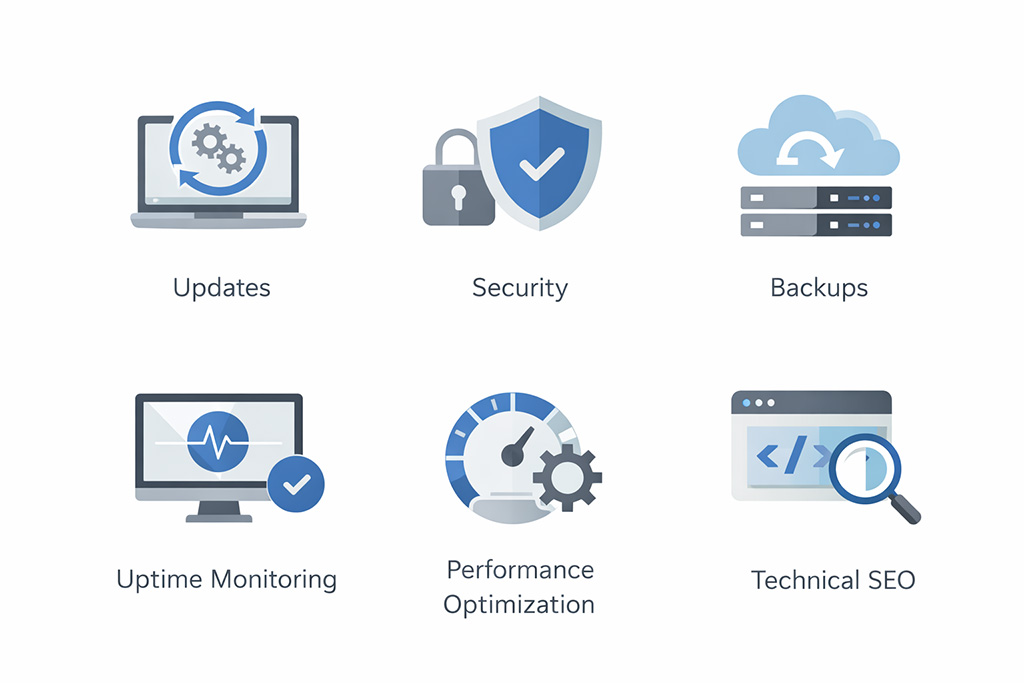
Most website maintenance plans bundle several core services together, but the level of service varies.
A typical WordPress maintenance plan includes:
- Core, plugin, and theme updates
- Daily backups with secure storage
- Security monitoring and malware scanning
- Uptime monitoring and downtime alerts
- Performance optimization and caching improvements
- Technical support and troubleshooting
Lower-cost plans often automate these tasks, while higher-level website maintenance services include proactive monitoring and ongoing optimization.
Now that we’ve covered what’s typically included, let’s look in detail at what you’re actually paying for.
What You’re Actually Paying For
Many website owners assume maintenance is just about updates, but WordPress website maintenance involves much more.
Updates and Compatibility
Updates must be managed carefully to avoid breaking functionality. Plugin conflicts, outdated themes, and compatibility issues are common causes of website downtime.
Security and Backups
Security is another major factor. Unpatched WordPress sites are common targets for malware and other vulnerabilities. Ongoing security monitoring, firewall protection, and login hardening are essential to protect your site.
Many vulnerabilities in WordPress websites come from outdated plugins or themes, which is why consistent security updates and monitoring are critical.
Backups are only valuable if they are recent and easily restored. Daily backups with fast recovery are far more reliable than occasional backups.
Unpatched WordPress sites are a common target for malware and vulnerabilities. According to Sucuri’s website security research, outdated plugins and themes are one of the most common entry points for attacks.
Performance Optimization
Performance optimization directly impacts SEO and user experience. Slow websites reduce conversions and rankings. This includes monitoring Core Web Vitals, optimizing load times, and ensuring your website delivers a consistent user experience across devices, as outlined by Google’s Core Web Vitals guidelines.
Technical SEO Maintenance
Technical SEO maintenance is often overlooked. Over time, sites develop crawl errors, broken links, and indexing issues that affect visibility in search engines. Addressing these issues is a critical part of ongoing maintenance.
For businesses investing in a structured WordPress maintenance service, these areas are handled consistently rather than reactively.
With a clear understanding of what you’re paying for, let’s move on to a critical but often overlooked aspect: uptime monitoring.
Uptime Monitoring
Uptime monitoring is another critical part of WordPress website maintenance that often gets overlooked. It involves continuously checking whether your website is accessible and functioning properly, typically in real time or at frequent intervals. If your site goes down—even briefly—you may not notice it, but search engines and potential customers do. For businesses that rely on inbound leads, even short periods of downtime can mean missed opportunities. Ongoing uptime monitoring ensures issues are detected immediately, allowing them to be resolved quickly and reducing the impact on both user experience and search visibility.
Now that you know the importance of uptime monitoring, let’s examine the factors that drive the cost of WordPress website maintenance.
What Drives the Cost of WordPress Website Maintenance?

Larger business websites with more pages, content, and functionality require more ongoing maintenance and support.
For most website owners, maintenance costs increase as the site becomes more critical to daily operations and lead generation.
Custom-built websites, especially those created through a strategic development process, require more experienced oversight, but they often perform better over the long term. Businesses investing in WordPress web design in Denver typically see fewer long-term maintenance issues due to cleaner architecture and better optimization from the start.
Website Size and Structure
Website size and structure play a major role. Larger sites with more pages, content, and functionality require more ongoing maintenance. Websites with high traffic typically incur higher maintenance costs due to the need for stronger hosting, ongoing performance tuning, and increased security monitoring.
Plugins and Integrations
Plugins and integrations also increase complexity. Each plugin introduces potential compatibility issues and security risks. The number of plugins and integrations on a WordPress site can increase maintenance costs, as each plugin requires regular updates and can introduce potential conflicts or security risks.
Ecommerce and Membership Sites
E-commerce websites and membership platforms require higher levels of maintenance due to payment processing, customer data, and uptime requirements.
Frequency of Updates
The frequency of updates required for a website directly impacts maintenance costs; sites that frequently add new content or features need more ongoing maintenance to ensure everything runs smoothly.
Customization and Hosting
Custom-built websites often require more specialized maintenance, but they provide better long-term performance and scalability.
Hosting environment also affects maintenance. Managed hosting can improve performance and security, but it does not replace ongoing site maintenance.
Support Level
Support level is another major factor. Faster response times and proactive support increase monthly costs but reduce risk.
With these cost drivers in mind, let’s look at the different types of WordPress maintenance plans available.
Understanding Different WordPress Maintenance Plans
Not all maintenance plans are structured the same way.
Basic Maintenance Plans
Basic maintenance plans focus on updates, backups, and basic security. These are suitable for low-traffic websites or personal projects.
Standard Maintenance Plans
Standard plans include uptime monitoring, performance checks, and ongoing support. These are typically used by small businesses that rely on their website for leads.
Advanced Maintenance Services
Advanced WordPress maintenance services include proactive monitoring, performance optimization, technical SEO support, and faster response times. These plans are designed for business-critical websites.
Now that you know the available plan types, let’s compare the main options for managing WordPress maintenance.
DIY vs Freelancer vs Agency Professional Maintenance
Many website owners choose between managing maintenance themselves, hiring a freelancer, or working with an agency.
DIY WordPress maintenance may appear cheaper initially, but it requires time, consistency, and technical knowledge, which can lead to hidden costs if issues arise.
Freelancers offer more support, but availability and response time can vary.
Agency-level website maintenance services provide structured processes, monitoring tools, and accountability. This reduces risk and improves long-term site performance.
For businesses investing in WordPress development or ongoing SEO, this level of support is often necessary.
Next, let’s see how these choices play out in the real world, using Denver businesses as an example.
Real-World Insight From Denver Businesses

In Denver, competition across service industries is high, and local search visibility is critical.
We often see businesses that invested in web design but failed to maintain their websites properly. Over time, performance declines, technical issues develop, and lead generation drops.
In one case, a Denver-based service business experienced a steady decline in leads due to slow page speed, broken forms, and indexing issues. None of these problems were obvious without monitoring.
After resolving performance issues and stabilizing the website, rankings and lead flow improved.
This highlights a common pattern. WordPress website maintenance is not just about keeping a site online—it directly impacts visibility and conversion.
Now, let’s discuss why opting for the cheapest maintenance plan can be risky.
Why Cheap WordPress Maintenance Plans Fall Short
Many low-cost website maintenance services focus on automation rather than active management.
They may include updates and backups, but they rarely include proactive monitoring, performance optimization, or technical support.
If a maintenance plan costs less than an hour of professional time per month, it’s unlikely that meaningful maintenance is happening.
Understanding the limitations of cheap plans, let’s clarify how often WordPress maintenance should be performed.
How Often Should WordPress Maintenance Be Done?
WordPress maintenance is not a one-time task—it’s ongoing.
Core updates, plugin updates, and security patches should be reviewed weekly. Backups and uptime monitoring should run daily. Performance checks and technical SEO reviews are typically handled monthly.
For business-critical websites, maintenance is continuous. Waiting too long between updates increases the risk of compatibility issues, security vulnerabilities, and performance decline.
Now, let’s look at some hidden costs that can affect your total maintenance budget.
The Hidden Costs of WordPress Maintenance
Premium Plugins and Themes
Many website owners overlook additional costs. Premium plugins and themes often require annual renewals.
Security and Emergency Support
Security issues can lead to expensive malware cleanup. Emergency support is often billed separately.
Downtime and Lost Leads
Downtime can result in lost leads, especially for service-based businesses.
Time Investment
There is also a time cost. Managing updates, troubleshooting issues, and coordinating services takes time away from running your business.
With these hidden costs in mind, let’s discuss how to choose the right maintenance plan for your needs.
How to Choose the Right WordPress Maintenance Plan
For most business websites, the right maintenance plan isn’t the cheapest—it’s the one that prevents downtime, protects search visibility, and supports consistent lead generation.
If your business website generates leads, supports SEO, or plays a role in your sales process, it requires consistent maintenance and support.
Look for a maintenance plan that includes updates, backups, security monitoring, performance optimization, and ongoing technical oversight—not just automated tasks.
For businesses focused on growth, maintenance should align with broader SEO services and digital strategy.
Now, let’s see how maintenance fits into a competitive local market like Denver.
WordPress Maintenance in a Competitive Market Like Denver
If your website is central to how your business generates leads, the quality of the build matters just as much as the maintenance plan. Many ongoing issues—performance problems, plugin conflicts, and SEO limitations—often trace back to how the site was originally built. If you’re evaluating long-term reliability, it’s worth understanding how custom WordPress web design in Denver impacts performance, scalability, and maintenance requirements.
In Denver, website performance plays a critical role in local search rankings. WordPress maintenance ensures that your site continues to perform as competition increases. For businesses investing in web design and SEO services, ongoing maintenance protects that investment. In competitive Denver industries such as home services, legal, and B2B, even small technical issues can affect search visibility and lead volume.
Is WordPress Maintenance Worth It?
If your website is important to your business, maintenance is worth the cost.
If your site generates leads, supports marketing, or represents your brand, it needs ongoing maintenance.
If it does not, the issue may be with your overall website strategy.
Let’s wrap up with a practical next step for evaluating your maintenance needs.
A Practical Next Step

If you’re unsure what level of maintenance your site needs, the best place to start is a simple evaluation.
Understanding your current website maintenance setup—what is being monitored, updated, and optimized—provides clarity.
From there, you can determine whether your current plan is sufficient or if improvements would increase performance, security, and long-term results.
FAQ
How much does WordPress maintenance cost per month?
Most WordPress maintenance costs range from $150 to $500 per month, depending on site complexity, traffic, and support needs.
What is included in a WordPress maintenance plan?
A maintenance plan typically includes:
- Core, plugin, and theme updates
- Daily backups
- Security monitoring and malware scanning
- Uptime tracking
- Performance optimization
- Technical support
Can I maintain my WordPress site myself?
Yes, but it requires time and technical knowledge. DIY maintenance increases the risk of missed updates and security issues.
Do I need maintenance if I have managed hosting?
Yes. Managed hosting handles server-level performance, but does not cover plugin updates, compatibility issues, or technical SEO.
What happens if I don’t maintain my WordPress website?
Without maintenance, websites become vulnerable to security risks, performance issues, and SEO decline over time.
How often should a WordPress website be maintained?
WordPress websites should be maintained continuously. Updates should be checked weekly, backups should run daily, and performance and SEO should be reviewed regularly to ensure long-term stability.