


Your Denver business shows up on Google. You claimed the listing years ago, filled in your address and phone number, and moved on. That’s more than most local businesses do — and exactly why your competitors are outranking you in local search results.
Google Business Profile optimization is one of the highest-impact local SEO activities a Denver business can invest time in. Most businesses have a profile. Almost none have optimized it. The result is a listing that exists but doesn’t convert — one that loses calls, direction requests, and website clicks to competitors who paid closer attention. Businesses with optimized profiles consistently outperform those that treat their listing as an afterthought.
This guide covers what Google Business Profile optimization entails, why it drives local rankings in Denver’s competitive market, the most common mistakes business owners make, and the exact steps to fix them. If you want to show up when Denver customers are searching for what you sell, this is where to start.
What Is Google Business Profile and Why Does It Matter for Denver Businesses?
Google Business Profile (formerly Google My Business) is the free listing that controls how your business appears across Google Search and Google Maps. When someone searches for a service near them — “plumber in Cherry Creek” or “Denver web design company” — the search engine surfaces a set of local results above the organic listings. That block of three map results is called the Local Pack, and it’s driven almost entirely by your GBP listing.
For local businesses in Denver, the Local Pack is prime real estate. Roughly 46% of all Google searches have local intent, meaning the search intent is to find a business, product, or service nearby. Appearing in those three spots generates more calls, website visits, and foot traffic than most other forms of digital marketing — at zero cost per click.
The problem is that claiming your profile is not the same as optimizing it. An incomplete or neglected profile signals to Google that your business is less relevant and less trustworthy than competitors who’ve taken the time to build out their listing properly. Search engine optimization for local visibility starts with getting this foundation right.
How GBP Affects Your Local Ranking
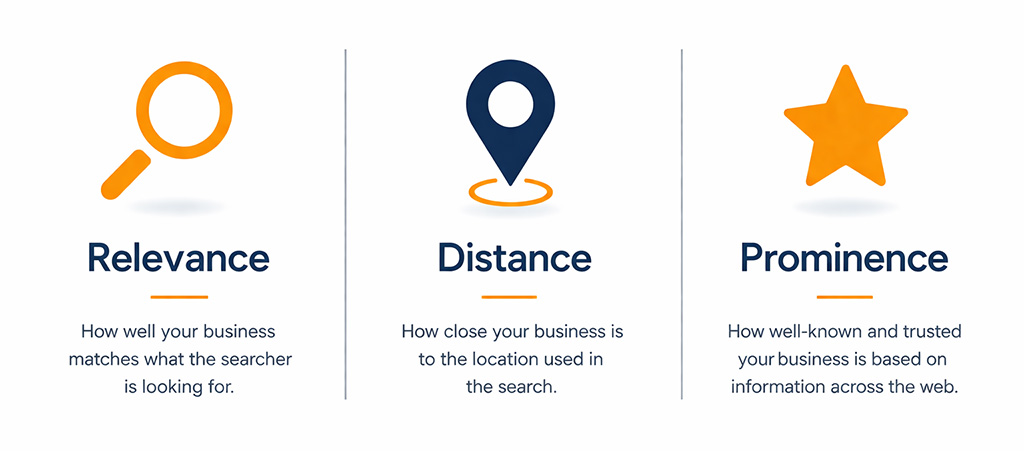
Google evaluates three factors when deciding which businesses appear in local search results:
- Relevance — How closely your listing matches what the searcher is looking for. The business category, the services listed, and the keywords in your description all contribute.
- Distance — How close your business location is to the searcher’s location or the area they specified. Your listed address and service area matter here.
- Prominence — How well-known and trusted your business is based on reviews, backlinks, citations, and overall online presence.
Optimizing your GBP directly improves your relevance and prominence signals — the two factors you can most effectively control.
The Most Common GBP Mistakes Denver Businesses Make
Most business owners set up their GBP once and never return. Here are the mistakes that cost them the most — and cost them new customers every month.
Incomplete Business Name, Address, or Phone Number
Your business name should match your real-world signage exactly — no keyword stuffing, which violates Google’s guidelines and risks suspension. Beyond that, your Name, Address, and Phone number (NAP) must be exactly consistent across your GBP listing, your website, and every directory where your business appears. A mismatched suite number or a disconnected phone number undermines your local SEO signals. Google cross-references this data, and an inconsistency creates doubt about your legitimacy.
No Photos or Outdated Photos
Businesses with photos receive significantly more direction requests and website clicks than those without them. An empty photo section — or one with a blurry exterior shot from 2019 — signals to both Google and potential customers that this listing isn’t actively managed. Fresh, high-quality photos of your storefront, workspace, team, and work product are required.
Ignoring the Q&A Section
Google’s Q&A feature lets anyone ask — and anyone answer — questions about your business. Most business owners don’t know this section exists until they discover a competitor or random user has posted inaccurate information. Proactively populating Q&A with the questions your customers actually ask gives you control over that content and adds keyword-relevant text to your listing.
Not Responding to Reviews
Review response rate is a trust signal for both Google and prospective customers. Ignoring a negative review doesn’t make it go away — it makes you look indifferent. A professional, specific response to negative feedback demonstrates accountability. Responding to positive reviews reinforces the relationship and encourages future customers to leave their own.
Wrong or Missing Business Category
Your primary category is one of the most significant relevance signals in your GBP listing. Choosing a category that’s too broad, too narrow, or simply incorrect will suppress your listing for the searches that matter most. Many local businesses never revisit their category after initial setup, even as Google adds more specific options over time.
No Posts, Products, or Services
Google Posts, the Services section, and the Products section are consistently underutilized. These features add keyword-relevant content directly to your listing, keep your profile looking active in search results, and give searchers more reasons to choose your business before they ever reach your website.
How to Optimize Your Google Business Profile Step by Step
Work through these steps in order. Each one builds on the last, and together they produce a profile that Google ranks higher and customers trust more. Local businesses that commit to all seven steps see the strongest results.

Step 1: Complete Every Field — Including Business Hours and Attributes
Log into your Google Business Profile dashboard and audit every field. Your business name should match your real-world signage exactly. Verify that your address, phone number, website URL, and business hours are current and accurate — including holiday hours and any seasonal changes. Inaccurate business hours are one of the fastest ways to lose a customer who shows up when you’re closed. Fill in the attributes that apply to your operation — these might include accessibility features, accepted payment types, or service options such as in-store pickup or online appointments.
Step 2: Choose the Right Primary and Secondary Categories
Your primary category should describe what your business is, not what it does. If you’re a web design agency, “Web Designer” is more specific and effective than “Internet Marketing Service.” After selecting your primary category, add secondary categories that reflect the range of your services. For a full-service agency, that might include “SEO Agency,” “Internet Marketing Service,” and “Software Company.” Each additional relevant category expands the set of searches your listing can appear for.
Step 3: Add High-Quality Photos That Reflect Your Business Location
Upload a minimum of ten photos across the following types: exterior shots so customers can identify your business location, interior shots that show your workspace or atmosphere, team photos that put a face to the business, and work samples or product images that demonstrate what you deliver. Photos should be well-lit, professionally composed, and current. Update them at least twice per year. Google favors listings with consistent photo activity over those that upload once and stop.
Step 4: Write a Keyword-Rich Business Description
Your business description has a 750-character limit. Use it. Open with your primary keyword and a clear statement of what you do and who you serve. For a Denver-based business, include your city and the neighborhoods or service areas you cover. Avoid generic language like “we are committed to excellence” — describe your actual services, your experience, and what distinguishes you from competitors. The description does not directly drive local ranking on its own, but it influences click-through decisions and supports relevance signals when it contains the right language.
Step 5: Collect and Respond to Google Reviews
Reviews are the most visible signal of prominence in your GBP listing. The local businesses that appear consistently in Denver’s Local Pack almost always have more reviews, more recent reviews, and higher average ratings than those that don’t. Build a process for asking satisfied customers to leave a review — a follow-up email, a text after service completion, or a direct ask at the end of a project. Respond to every review: thank positive reviewers specifically, and address negative reviews calmly and professionally. Do not offer incentives for reviews, which violates Google’s policies.
Step 6: Use Google Posts Weekly
Google Posts appear directly on your listing and function like a mini feed of updates. Use them to announce new services, share blog content, promote seasonal offers, or highlight recent projects. Posts expire after seven days unless pinned, so a weekly cadence keeps your listing looking active. An active posting history signals to the search engine that your business is engaged and relevant — a signal that dormant listings cannot compete with.
Step 7: Add Products and Services with Descriptions
The Services and Products sections let you build out your listing with keyword-rich content that goes beyond your business description. List each service individually with a clear name and a two-to-three sentence description that includes relevant terms your customers would search. This content is indexed by Google and directly supports the relevance signals that determine which searches your listing appears for. Optimized profiles that fully utilize these sections consistently outperform bare-bones listings in competitive local markets.
Local SEO Signals That Support Your GBP Ranking

Google Business Profile optimization doesn’t exist in isolation. Your listing is one signal in a larger local SEO ecosystem, and the strength of your overall presence determines how far optimization can take you.
Citation consistency is foundational. Every mention of your business name, address, and phone number across the web — on Yelp, the Better Business Bureau, local Denver directories, and industry-specific sites — is a citation. When those citations are consistent with your GBP listing, they reinforce your legitimacy. When they conflict, they create confusion that suppresses your local ranking. Building and cleaning up citations is one of the most reliable ways to strengthen local search results performance for Denver businesses.
Your website’s on-page SEO also reinforces your GBP signals. A site with properly structured local landing pages, location-specific content, and consistent NAP data in the footer gives Google more evidence that your business is who it says it is, located where it says it’s located. The connection between your website’s on-page SEO foundation and your GBP performance is direct — businesses with strong website signals consistently outrank those that rely on GBP alone.
Backlinks from Denver-based sources — local news sites, business associations, neighborhood blogs, and industry directories — build the prominence signals that help your listing compete for high-volume local searches. Review velocity and recency also matter: a steady flow of new reviews outperforms a burst of reviews followed by months of silence.
Related Reading: See our guide to hub-and-spoke local SEO structure for service area businesses, and our on-page SEO guide for the website signals that work alongside your GBP listing.
How to Track Whether Your GBP Is Actually Working
Google Business Profile’s built-in Insights dashboard shows you the data that matters most for evaluating performance. Check these metrics monthly:
- Search queries — The actual terms people used to find your listing. This reveals which search intent signals you’re satisfying and which opportunities you’re missing.
- Profile views — How many times your listing appeared in search results. A flat or declining trend after optimization usually indicates a category or citation issue.
- Direction requests — Strong indicator of intent. Customers requesting directions to your business location are close to making a purchase decision.
- Calls — Calls directly from your listing are trackable and indicate that your listing is compelling enough to drive action.
- Website clicks — Traffic from your GBP listing to your website. Low click-through relative to views often points to a weak description or insufficient reviews.
Google Search Console is a useful companion tool for tracking branded search volume — searches that include your business name. An increase in branded searches after Google Business Profile optimization typically indicates that your listing is building awareness and trust in the local market.
If your impressions are growing but calls and direction requests are flat, the issue is likely conversion — your profile is being seen but not compelling action. That’s usually a problem with review count, photo quality, or description. If impressions are flat or declining, the issue is visibility — category, citation consistency, or a lack of ongoing activity.
Frequently Asked Questions About Google Business Profile Optimization
Is Google Business Profile free?
Yes. Creating and managing a Google Business Profile is free. Google charges nothing for the listing itself, for posting updates, or for appearing in the Local Pack. The investment required is time — to optimize the profile initially and to maintain it consistently over time.
How long does it take to see results from GBP optimization?
Most businesses see measurable improvements in profile views and calls within four to eight weeks of a thorough optimization. Competitive markets like Denver take longer, particularly for high-volume search terms. Review acquisition is the variable that most strongly affects the timeline — businesses that actively collect reviews see faster results than those that don’t.
Can I have multiple Google Business Profile listings?
Google allows one listing per physical location. Service-area businesses that operate from a home address can hide their address and set a service area instead. Creating multiple listings for the same location or using a PO box as a business address violates Google’s guidelines and can result in suspension of all associated listings.
What’s the difference between Google Business Profile and Google Maps?
Google Maps is where your listing appears to users. Google Business Profile is the dashboard you use to manage what appears there. Optimizing your Google Business Profile directly controls how your business looks on Google Maps and in Google search results.
How many reviews do I need to rank in the Local Pack?
There is no specific number that guarantees Local Pack placement. Google evaluates review count, recency, rating, and response rate as part of the prominence calculation. In Denver’s market, local businesses in most service categories need 20-30 reviews to compete for Local Pack visibility, with ongoing acquisition required to maintain their position against competitors who are also collecting reviews.
Start Showing Up Where Denver Customers Are Searching
A fully optimized Google Business Profile is one of the fastest ways to improve local search results visibility without spending money on ads. The local businesses consistently appearing at the top of Denver’s Local Pack aren’t there by accident — they’ve built complete, active, and well-reviewed listings with optimized profiles that give Google every reason to surface them first.
If your current listing is incomplete, your reviews are thin, or you haven’t looked at your GBP dashboard in months, you’re leaving new customers on the table. The steps in this guide are actionable today. Work through them systematically, and track your Insights data monthly to measure the impact.
If you’d rather have a local SEO team handle it — profile optimization, citation building, review strategy, and the on-page signals that reinforce your GBP rankings — SiteWired has been doing exactly this for Denver businesses since 1998. Schedule a free consultation, and we’ll take an honest look at where your local search presence stands and what it would take to move it.